PIT-28 is an annual tax form for people who pay tax on revenue (that is, what comes into your account), not on profit after expenses are deducted. In practice: you look at how much you earned on settlements/invoices, not at how much you spent on fuel or repairs.
If you are a driver for Uber, Bolt, and Freenow, or you work as a courier for Glovo, Uber Eats, Bolt Food, Wolt, Stuart, Jush, and you have a lease agreement, then PIT-28 will most often be your annual tax return in Poland.

BECOME A TAXI DRIVER
Work and earn right away!



Who as a driver or courier files PIT-28
Most often, this form is filed by a driver or courier who:
- have rental income (e.g. rent out a car, scooter or bicycle) – in this case, the rate of 8.5% applies,
- does not settle on general principles (tax scale) or with a flat tax.
Important: PIT-28 is for those who settle “on revenue.” If you work on an employment contract and receive PIT-11 – you usually file PIT-37, not PIT-28.
PIT form and costs: many people get this wrong
In this way of settlement, you usually don’t enter business expenses as “costs” that reduce your tax. So fuel, service, tires, or leasing will not reduce tax in PIT-28 the way they do for people on the tax scale or flat tax.
This doesn’t mean that invoices and receipts are unnecessary. They can be useful for other matters (such as VAT or inspections), but in PIT-28 the key things are: total revenue and the correct tax rate.

What lump-sum rates a driver can have
The tax rate depends on what exactly you do and how your business is registered (e.g. PKWiU/PKD codes). If you’re not sure, check your entry in CEIDG, your contract with the accounting office, or ask your accountant directly which rate you should use.
Below is a simple cheat sheet to make settlement easier to understand:
| What you do as a driver | What usually matters | Effect in PIT-28 |
|---|---|---|
| Transport services | Type of service and PKWiU | You choose the appropriate tax rate |
| Rental (e.g. car rental) | Whether it’s private rental or company | Included in PIT-28 and often it is 8.5% |
| Multiple sources of revenue | Separation of revenue sources | In PIT-28 you present them separately (according to rates) |
How to file PIT-28?
Below is a simple scheme that works for most people. Treat this as a short guide to go through the settlement without stress.
Gather your data (before you click anything)
Prepare:
- the total amount of revenue for the year (e.g. from your revenue register),
- information on whether you have one tax rate or several (e.g. transport separately, rental separately),
- deductions/reliefs that may apply to you,
- login details for your e-Tax Office account.
If you have an accountant/accounting office – ask for a summary of revenue “by rates.” That really shortens the whole process.
Enter the e-Tax Office and find e-PIT
The easiest way to file your return is online in the e-Tax Office. The system sometimes gives hints, but you should still make sure you’re using the correct form: PIT-28.
Enter your income and assign the tax rates
The most important rule: do not lump all your income into one field if you have different types of income. If part of your revenue comes from, for example, transportation services and part from rental – enter them separately, according to the appropriate rate.
Check the reliefs and deductions that may apply to you
Not all reliefs are available with this reporting method, so don’t blindly click “next.” Most people typically check:
- contributions (e.g., social/health – depending on the rules for a given year)
- deductions that do not require reporting business expenses.
Sign and send, then download your UPO
After sending, be sure to download the UPO (Official Receipt Confirmation). This is your proof that the declaration was sent and accepted.

Step-by-step instructions for submitting your declaration
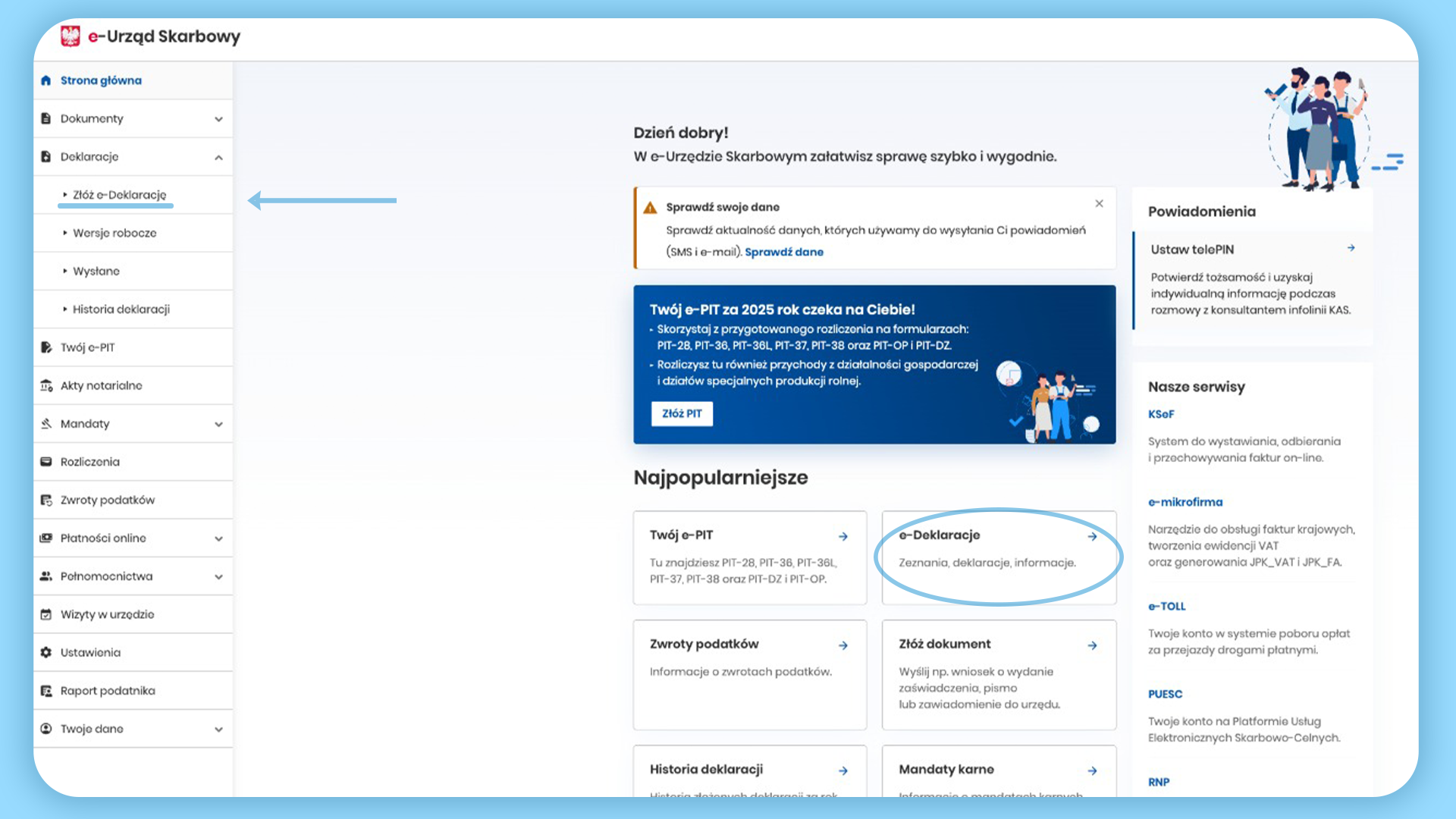
Step 1: On the e‑Tax Office home page, go to “Declarations” → “Submit an e‑Declaration” and select the “e‑Declarations” tile.
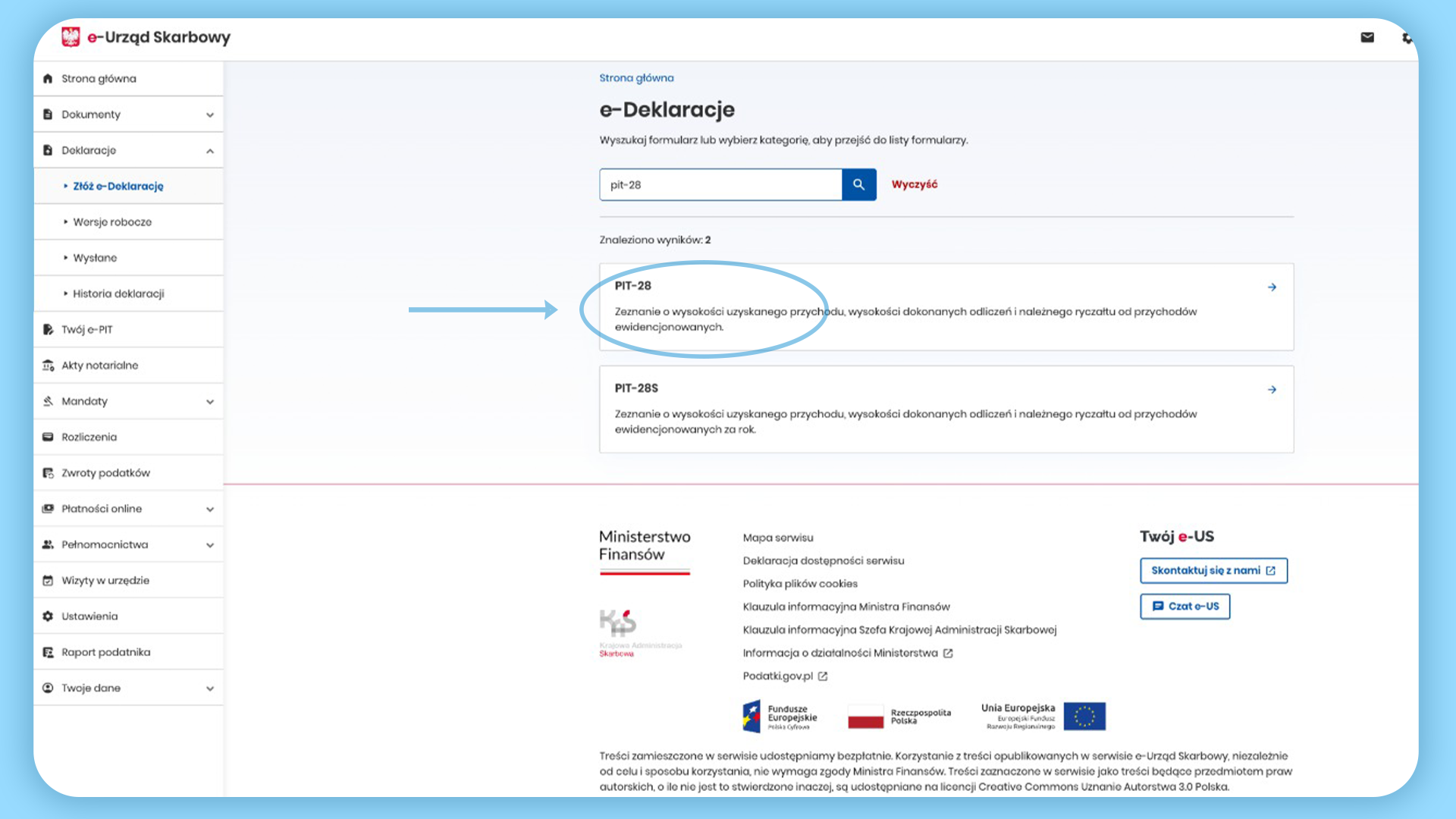
Step 2: In “e‑Declarations”, search for “PIT‑28”, then click the “PIT‑28” form from the results list.
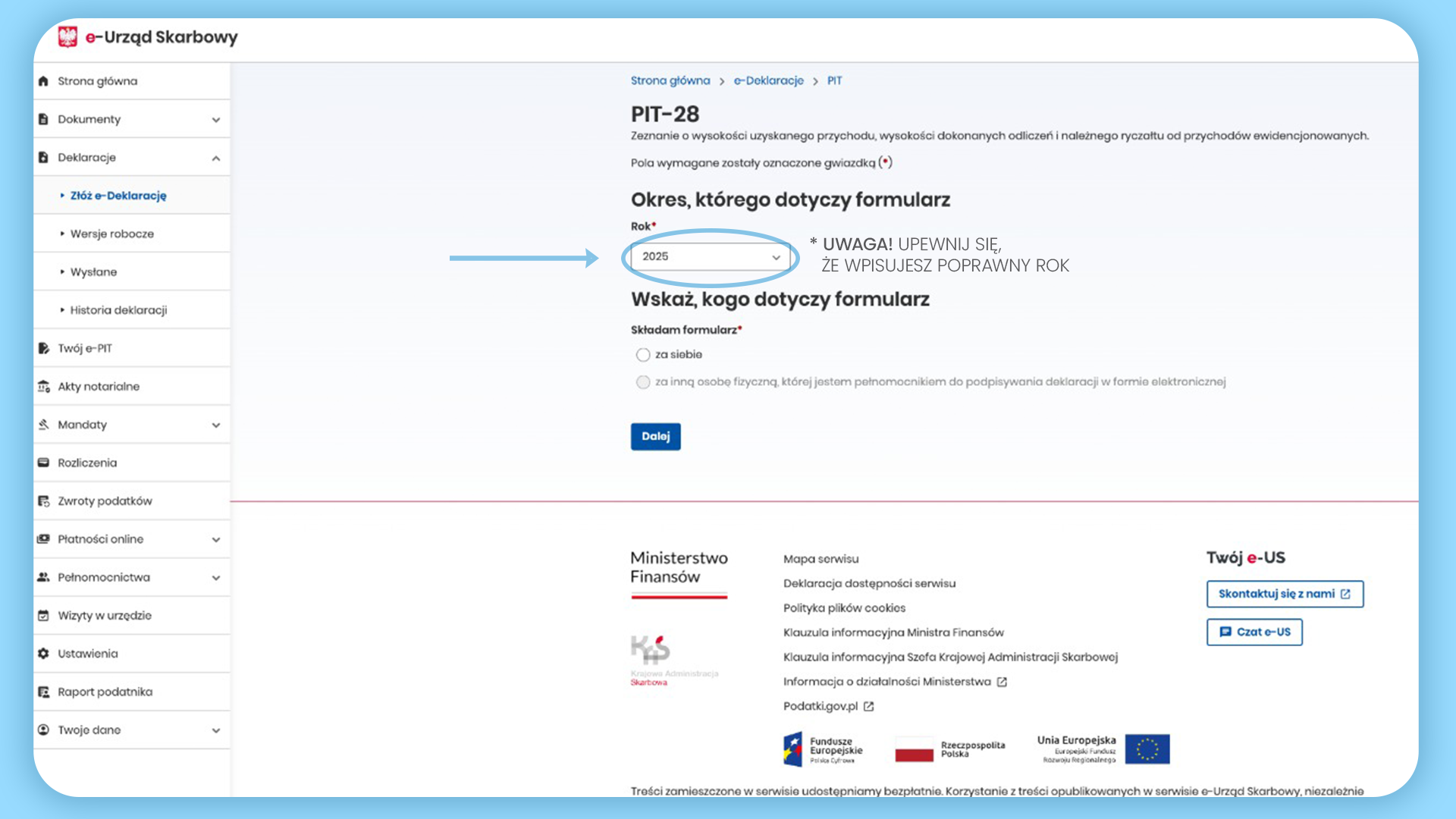
Step 3: Select the correct year (e.g., 2025), indicate who the form applies to, and click “Next” to proceed to filling it in.
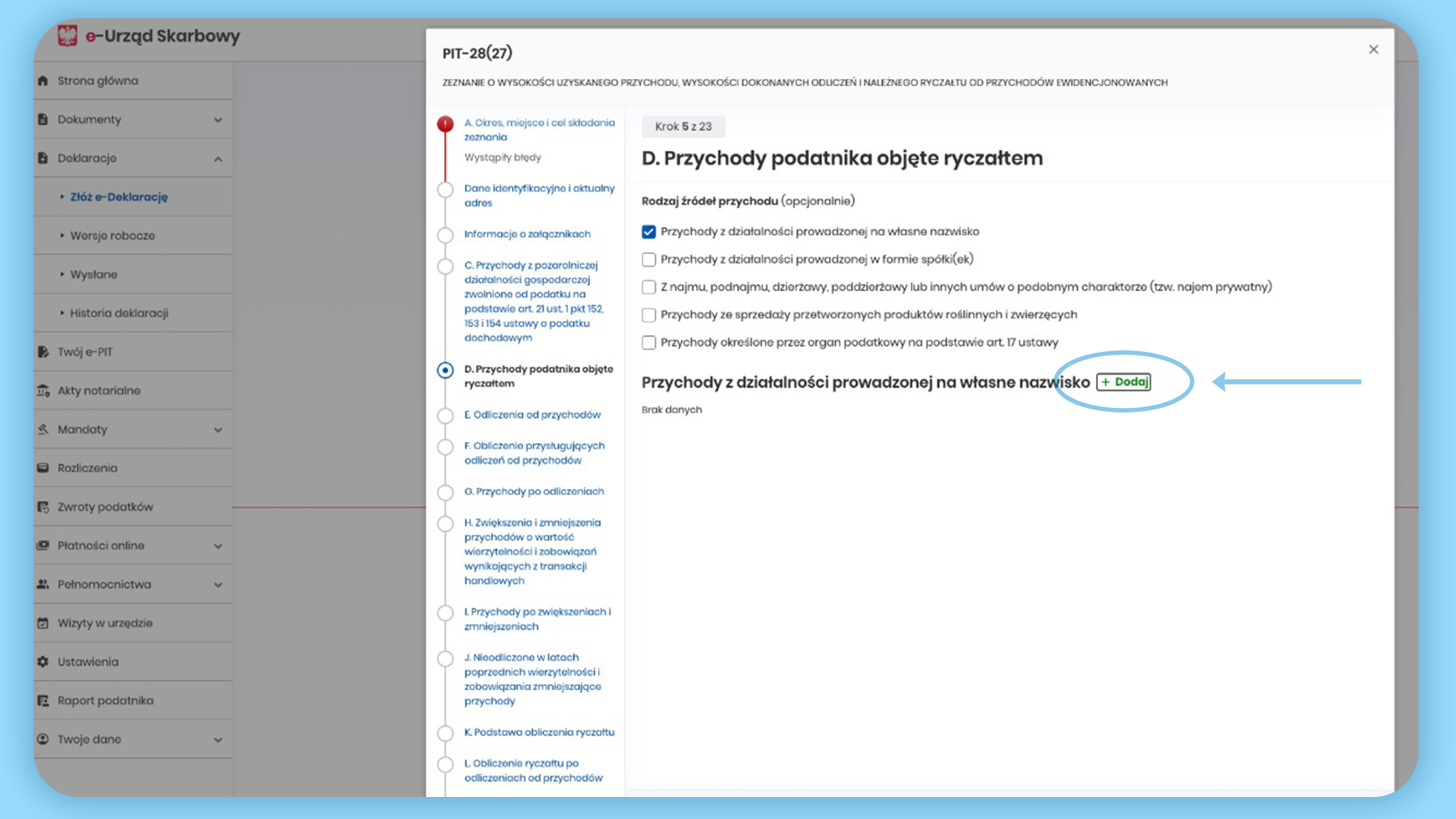
Step 4: In the “Taxpayer’s revenue subject to lump‑sum taxation” section, click “Add” to enter your revenue (e.g., from business activity under your own name).
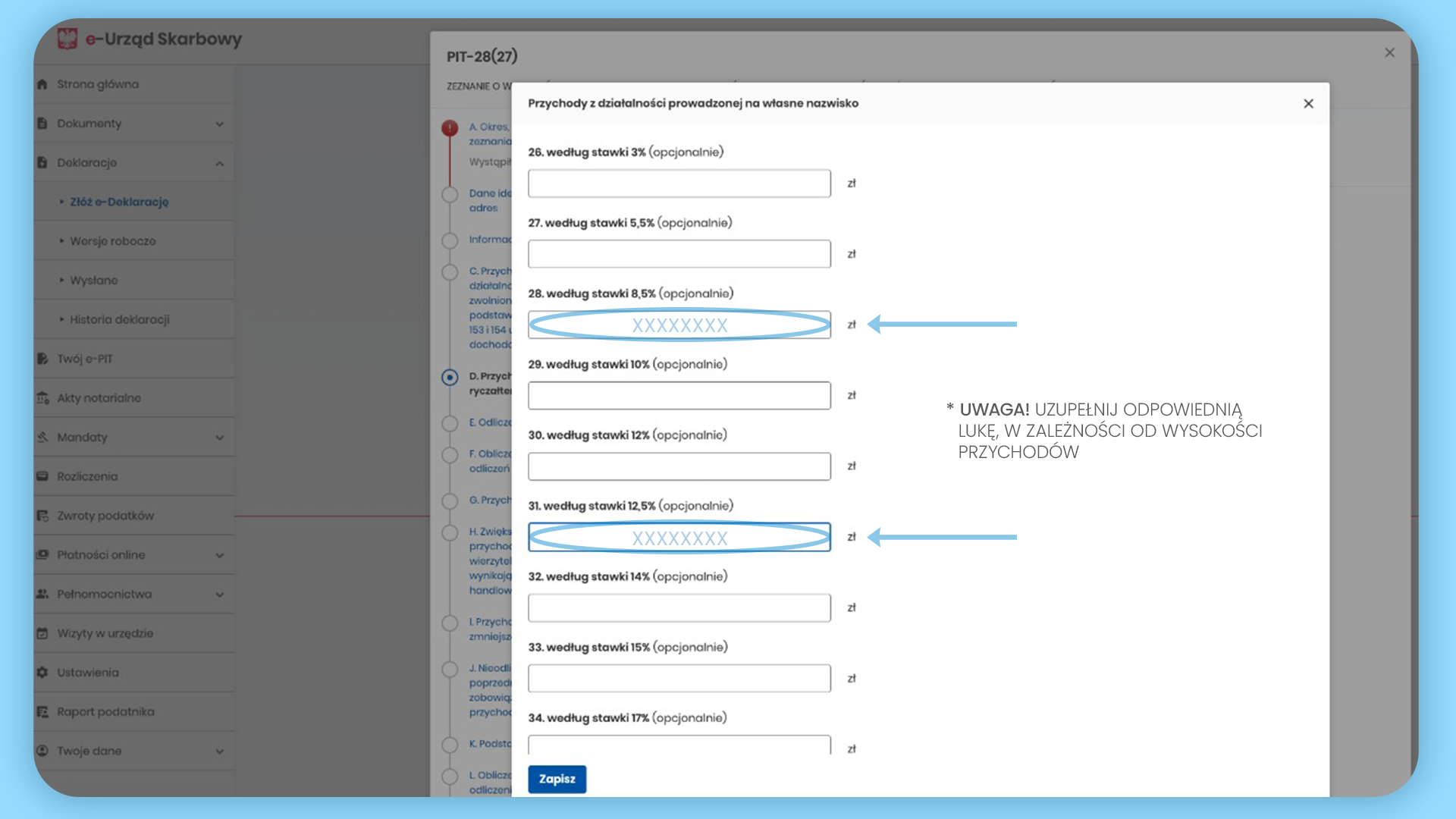
Step 5: Enter the amounts in the fields corresponding to the correct lump‑sum rate (fill in only the ones that apply to you), then click “Save”.
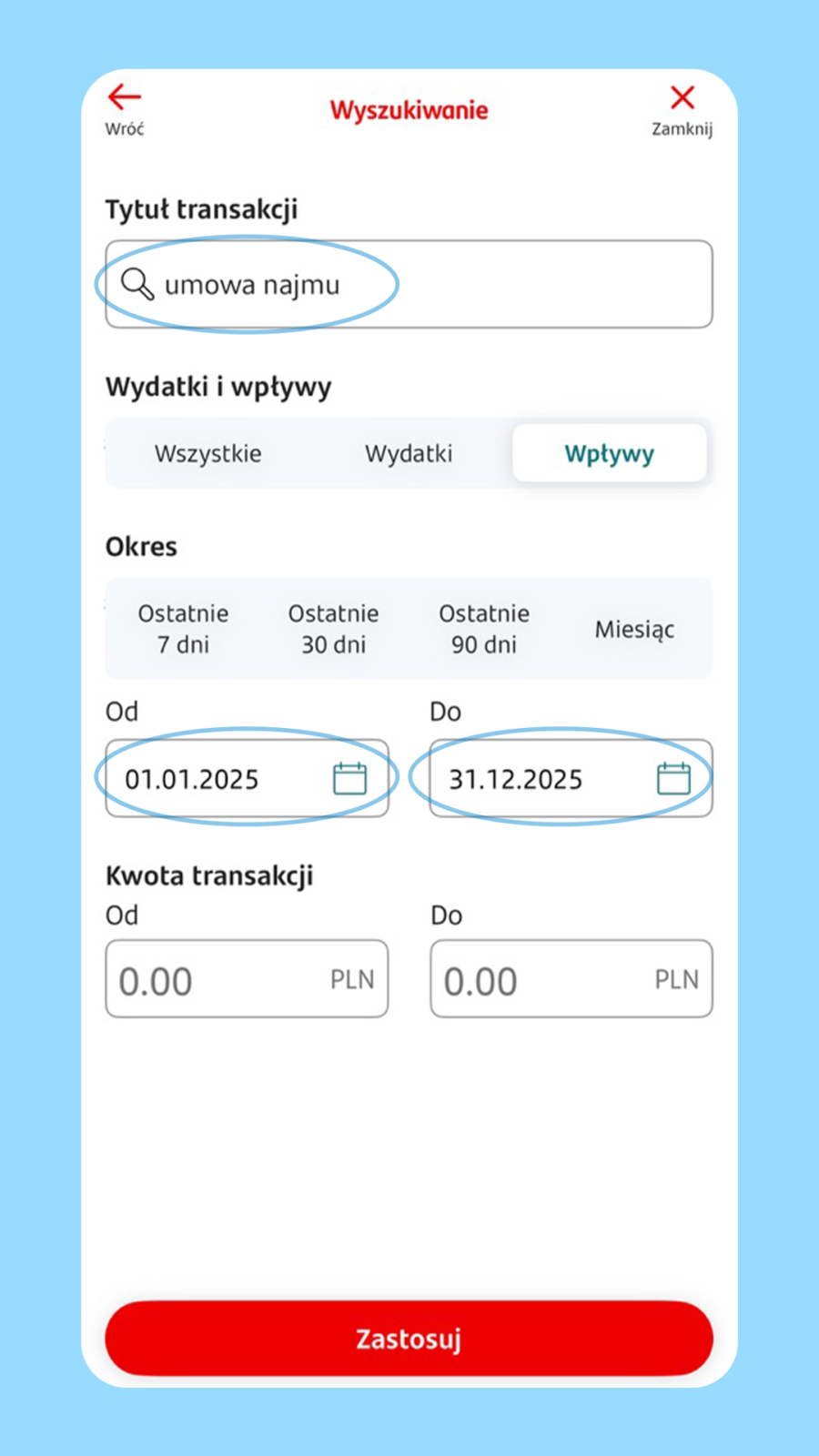
Step 6: Example view in a banking app after logging in: in history/reports, find the relevant transactions and set the date range (e.g., 01/01–12/31) to easily total your PIT‑28 revenue.
The most common mistakes drivers and couriers make with PIT-28 (and how to avoid them)
You can avoid them in 5 minutes, seriously:
- Choosing the wrong form (e.g., PIT-37 instead of PIT-28) – check how you should file first.
- Mixing up tax rates – separate your income according to the type of work (e.g., transport separately, rental separately).
- Entering expenses “like an employee” or on the general tax scale – here you usually don’t lower your tax with fuel or repair costs.
- No UPO – without it, you have no proof of submission.
- Leaving submission to the last minute – stress increases, and a small mistake could mean corrections.
When and Where to File PIT-28
The most convenient way to file PIT-28 is electronically – via the e-Tax Office. It’s the fastest option and usually involves the least paperwork. Deadlines can change, so check the current date for the given year in the e-Tax Office or at podatki.gov.pl.
Summary
If you’ve made it this far, you already know the core: with PIT-28 the key is to enter the correct income and assign the right tax rate. Most mistakes happen not with the calculations, but by lumping different services into one field or assuming that expenses (fuel, service) will automatically reduce your tax.
Do it calmly: gather your information, separate your income according to rates, file the declaration online and download the UPO. If you have several types of income (e.g., driving + rental at 8.5%), it’s worth asking your accountant about assigning the correct rates – that’s the simplest way to avoid corrections and stress later.
BECOME A COURIER
Work and earn right away!